SPARKHub is completing updates and will launch on December 1st , 2026

2nd November 2026
Organisation: EPFL
Authors: Francesco Mondada, Daniel Burnier
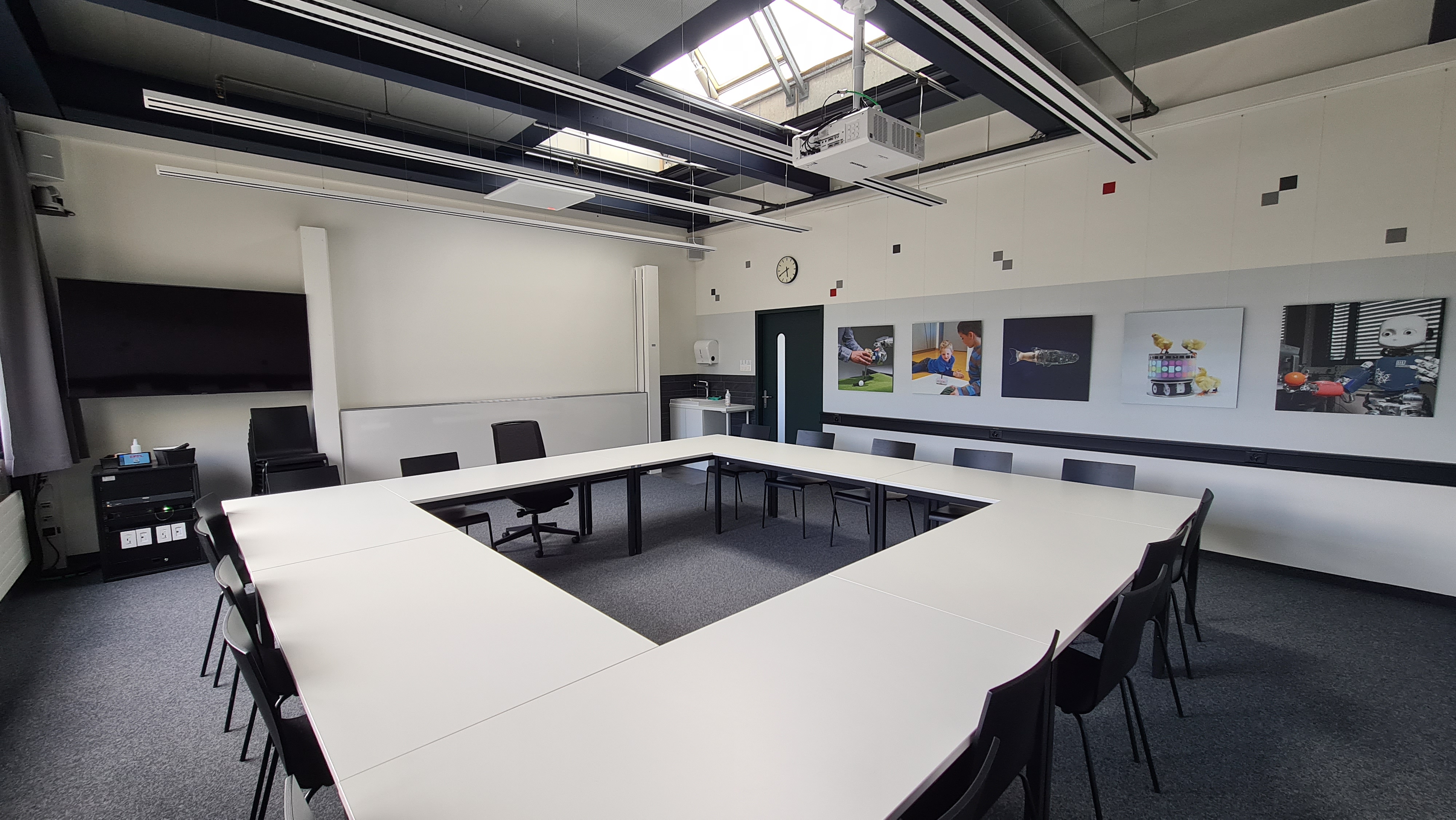
During the COVID-19 period, a group of laboratories located on the same floor of a university building converted a meeting room into a dedicated videoconferencing space. The room was equipped with a central projector and a secondary display, both accessible through HDMI connections. Additional equipment included front and rear pan-tilt-zoom (PTZ) cameras, a room microphone, and speakers, all connected via USB.
To provide flexibility for users, two connection panels were installed, one at the front and one at the rear of the room. Each panel included HDMI and USB connections, and a touchscreen interface allowed users to select the active panel. The installation followed the university's standard procedures for audiovisual systems and was similar to configurations used in lecture theatres and auditoriums, with the main difference being the inclusion of two user access points rather than one. This setup allowed users to connect their own computers and use the room with any videoconferencing platform, rather than relying on a system integrated with a specific software solution.
Following installation by an external provider, we examined the system architecture in more detail and found that the visible equipment represented only part of the overall infrastructure. Because HDMI and USB signals needed to travel significant distances within the room, multiple signal extenders and converters were required. HDMI connections were converted to run over Ethernet cabling and then converted back to HDMI at the destination. Similarly, USB connections for the cameras, microphone, and speakers relied on extender hardware. The presence of two connection panels further increased the number of devices required, along with switching equipment to manage panel selection.
As a result, the room contained a substantial amount of supporting hardware that remained powered continuously and did not include energy-saving or sleep functions.
Electrical measurements carried out by our facilities engineer showed that the system consumed:
606 W during active use
206 W when idle or in standby mode
The standby consumption was considered excessively high, particularly given that the system was not in use for most of the day. We were informed that while the dual-panel arrangement added some complexity, the hardware itself was standard equipment used in many university installations. Reducing energy consumption would therefore require changes to the system design rather than simple configuration adjustments.
We initially installed a general switch to disconnect power to the entire room when the system was not in use. However, this approach proved impractical. The control interface required several minutes to start up, and repeated power cycling occasionally caused system start-up issues, leaving the room unavailable for 15–20-minute periods.
We identified that the double panel configuration was creating difficulty, so we removed the rear connection panel and returned to a single access point. This reduced the overall complexity of the system and eliminated the need for the switch and touchscreen display. Despite this simplification, measurements from similar single-panel installations still showed standby power consumption of more than 80W. We then rewired the system so that all equipment could be powered from a single location. Most of the hidden signal extension devices could receive power through the ethernet connection itself, allowing their power supplies to be consolidated. The projector and display power supplies were also rewired to the same central point.
With all power supplies grouped together, we installed a mechanical switch to allow the entire audio-visual system to be turned on or off quickly and reliably. Unlike the previous arrangement, the system could be restarted within seconds when required.
To support the new operating procedure, we retrained users and put reminder stickers to encourage people to switch off the system after use.
The videoconferencing equipment is typically used for only a few hours each day, with the room otherwise functioning as a standard meeting space. For the purposes of estimating energy savings, we assume that the videoconferencing system is used for five hours per day, which is likely an overestimate.
Before the intervention, the infrastructure remained powered continuously, resulting in annual standby energy consumption of approximately 1.8 MWh/year.
After the intervention, the system can be switched off for approximately 19 hours per day, saving approximately 1.4 MWh/year.
This represents a substantial reduction in energy consumption with only minor changes to the room's operation.
Videoconferencing and presentation systems often contain a significant amount of supporting infrastructure that is not visible to users. Devices used to extend HDMI and USB signals across a room can contribute substantially to overall energy consumption, particularly because many do not include low-power standby modes.
By contrast, much of this equipment can be powered from a single central location, making it possible to switch off the entire system when it is not needed. Designing installations around a centralised power architecture from the outset can significantly reduce energy use without affecting functionality.
In this case, the modifications required only modest changes to the existing installation but delivered substantial ongoing energy savings. Considering power management during the design stage could help achieve similar benefits in future audio-visual and videoconferencing projects.